
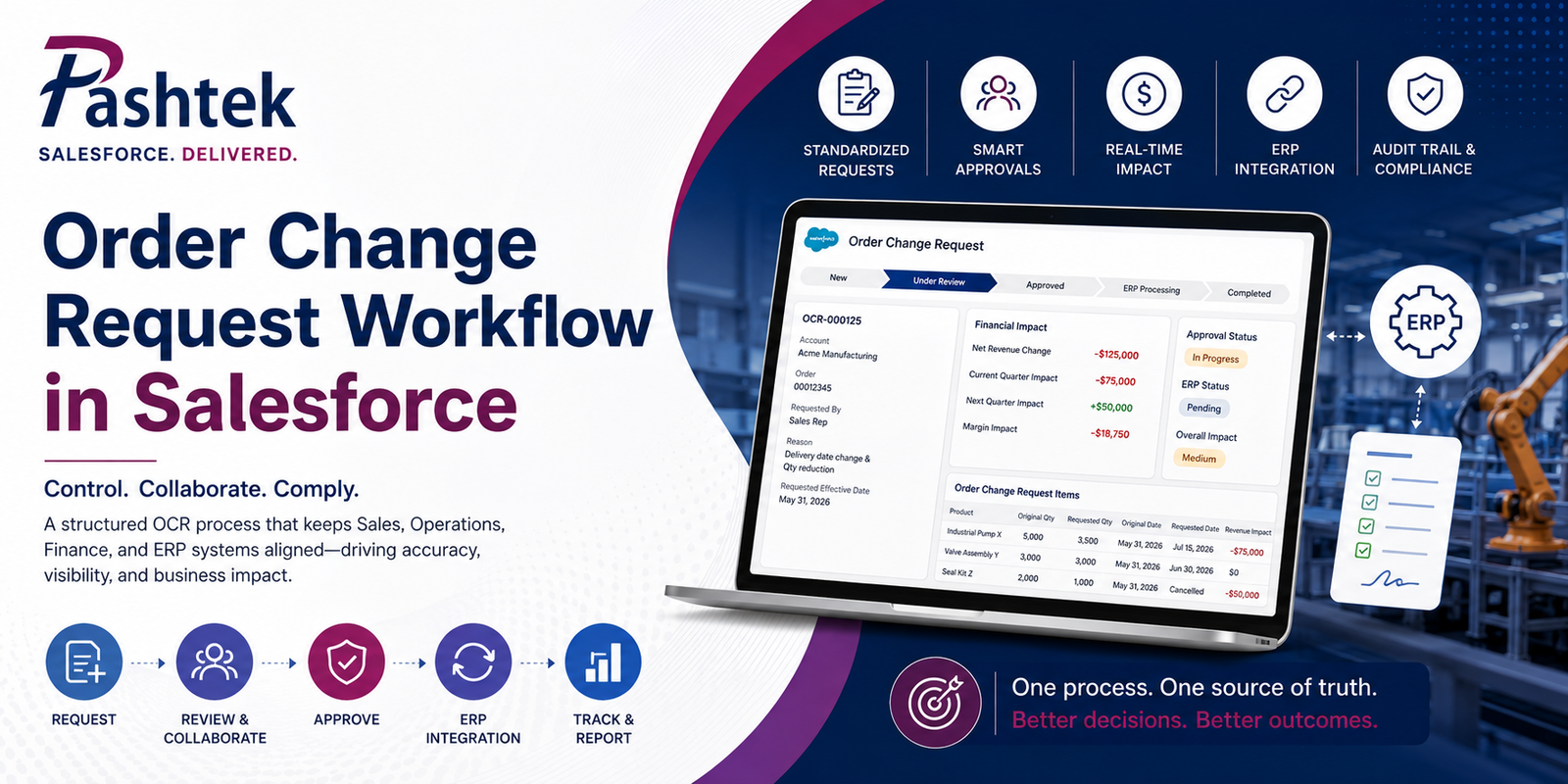
How to Handle Order Change Requests in Salesforce? A Manufacturing Playbook
Manufacturing orders rarely stay unchanged from booking to fulfillment. Here’s how to build a controlled Order Change Request workflow in Salesforce that keeps Sales, Operations, Finance, and ERP systems on the same page.
The problem nobody wants to talk about
Manufacturing orders don’t stay static. Customers reduce quantities two weeks before shipment. Delivery dates slip into next quarter because a customer’s own project got delayed. Product substitutions happen because inventory shortages force replacements. Cancellations arrive after production capacity is already committed and raw materials already purchased.
Every one of these changes touches production schedules, inventory allocation, revenue recognition, quarterly forecasts, margin calculations, and customer communication. Handled well, order changes get processed in hours with clean audit trails and clear accountability. Handled badly, they move through disconnected emails, personal spreadsheets, and phone calls, and by the time Finance sees the true financial impact, the quarter forecast is already broken.
If your manufacturing operation runs on Salesforce and you’re still processing order changes through informal channels, this playbook is for you.
Why Order Change Requests break without structure?
Consider what happens at a typical mid-market industrial components manufacturer when a customer requests an order change.
The original order runs 10,000 units, scheduled for delivery this quarter, with pricing and margin already agreed. Production capacity has been reserved. Raw materials are on order. Revenue sits in the current quarter forecast.
Three weeks in, the customer emails their sales rep asking to reduce the quantity to 7,500 units and push the delivery date into next quarter.
Without a controlled process, here’s what typically happens next.
The sales rep confirms the change to keep the customer happy. Operations finds out from an email forwarded three days later. Finance discovers the revenue reduction when the ERP order gets modified without a corresponding forecast update. The current-quarter forecast still shows the original revenue. The customer receives inconsistent updates about their delivery date because Sales, Customer Service, and Operations are working from different information.
By the time everyone realizes the disconnect, the change has already affected two quarters, three teams have manually updated their own systems, and there’s no single audit trail explaining who approved what.
This is not a Salesforce problem. This is a process problem that Salesforce can fix if it’s designed correctly.
What a proper Order Change Request workflow looks like?
A well-designed OCR workflow in Salesforce creates a single, controlled path for every order modification. The workflow starts from an activated Salesforce Order, captures the requested changes in a structured way, calculates the financial and operational impact automatically, routes the request to the right approvers based on impact, integrates with the ERP after approval, and maintains a complete audit trail throughout.
Here’s how the architecture breaks down.
The two-object data model
At the foundation, you need two custom Salesforce objects.
Order Change Request Header captures the metadata of the change: which order it modifies, which customer requested it, the reason, the requested effective date, current status, approval status, ERP processing status, and cumulative financial impact.
Order Change Request Items capture the line-level detail: which order products are affected, original versus requested quantity, original versus requested delivery date, cancellation amounts, replacement products, and per-line revenue impact.
This structure separates the change request itself from the individual lines being changed, which matters because a single OCR often modifies multiple lines on the same order.
The user experience
The sales rep or customer service user starts from the Order record. A “Create Order Change Request” button opens a Lightning Web Component that displays all the order’s active lines in an editable grid.
The user picks the lines being changed and enters the requested modifications: quantity reduction, delivery date change, product substitution, partial cancellation, or full cancellation.
As they type, the component calculates and shows the impact in real time: net revenue change, current-quarter versus next-quarter movement, and margin effect. The user sees the financial implications of what they’re requesting before they submit it.
This real-time feedback is important. It prevents accidental large changes from going into the approval queue without the requester understanding what they’ve asked for.
The OCR Control Hub
At the center of the design sits what we call the OCR Control Hub. This is the custom automation layer built with Salesforce Flow and Apex that handles four things: validation, calculation, approval routing, and integration.
Validation prevents bad requests
Before a request can move into approval, Salesforce runs validation checks: a reason must be provided, at least one line must be selected, requested quantities can’t exceed original quantities, replacement products must be properly linked, another active OCR can’t exist for the same order lines, and requests can’t be submitted after a fiscal cutoff date if your operations enforce one.
These checks stop 80% of the operational noise before it reaches approvers. Incomplete requests get sent back to the requester with clear error messages instead of clogging Operations and Finance queues with review work.
Calculations that finance can trust
The Control Hub calculates every financial dimension automatically. Original revenue. Requested revenue. Cancelled revenue. Replacement revenue. Net revenue impact. Margin impact. Backlog impact.
More importantly, it handles quarter movement correctly.
For a manufacturer running a calendar fiscal year, moving a $500K order line from December to February shifts $500K from Q4 to Q1 of the next fiscal year. That’s a two-quarter impact that shows up on two forecasts.
For a manufacturer running a non-standard fiscal year (April through March, for example), the same date change might land entirely within Q4 of one fiscal year rather than crossing quarters. The Control Hub applies the correct fiscal calendar and reports the right impact.
Getting this right matters because Sales forecasts, Finance reports, and executive dashboards all depend on the same underlying quarter logic. When the OCR workflow calculates it once and everyone reads from the same source, quarterly numbers finally reconcile.
Cross-functional approval routing
Once a request passes validation, it needs approval from the right people based on the change’s impact. Different changes need different approvers.
Small changes with minimal revenue impact might only need Sales Manager approval. Medium changes involving significant quantity reductions or delivery date movements need Operations, Sales Management, and Finance in parallel. Large changes crossing revenue thresholds or moving multiple quarters need executive approval from a VP of Sales or Business Unit Leader.
The routing logic should consider revenue impact, margin impact, cancellation value, delivery date movement, product family, region, customer tier, and how close the current fiscal period end is.
What each approver actually reviews
Operations evaluates inventory availability, production capacity, raw material constraints, manufacturing lead time, and whether the requested delivery date is feasible. If Operations rejects a delivery date change because production capacity is already committed elsewhere, that feedback goes back to Sales before the customer gets a promise Operations can’t keep.
Finance evaluates revenue reduction, margin impact, pricing changes, cancellation exposure, and quarter movement. Finance often catches revenue-recognition issues that Sales doesn’t see: a cancellation of a shipped item requires reversal of already-recognized revenue, which is different from cancelling an unshipped item.
Sales Management evaluates customer impact, commercial justification, forecast implications, and account strategy. A quantity reduction from a strategic customer might be worth accepting to preserve the relationship even if it hurts short-term revenue.
Locking prevents mid-review changes
While a request sits in approval, the OCR record should lock. Otherwise, the requester can modify the details mid-review, and approvers end up approving something different from what they originally saw. Locking removes this failure mode entirely.
Approvers can either approve or reject with comments. Rejected requests go back to the requester with clear feedback about why. Approved requests move automatically to the next step: ERP integration.
ERP and planning system integration
After approval, Salesforce is the system of record for the approval and audit trail. But the ERP is where the actual order change gets executed for production planning, inventory allocation, and financial recognition.
The integration typically works one of three ways depending on your existing infrastructure.
Salesforce Platform Events work well for real-time event-driven integrations where the ERP subscribes to change events published by Salesforce. This approach shines when you have modern middleware or direct API integration between Salesforce and the ERP.
Middleware platforms like MuleSoft, Workato, Boomi, or AWS integration services work well for enterprises with existing integration platforms. These platforms handle the reliability, retry logic, error handling, and transformation between Salesforce and the ERP data models.
Direct REST APIs work well for simpler integrations where the ERP exposes a modern API and doesn’t require heavy transformation logic.
Regardless of the integration approach, the ERP integration should send the approved change to the ERP, receive an acknowledgment with the ERP request number, poll or listen for processing completion, and update the OCR record with the final ERP status.
If the ERP rejects the change (which happens when inventory has moved or production schedules have shifted since approval), Salesforce should capture that rejection, notify the requester, and provide clear next steps.
The complete architecture in one view
The diagram below shows how these components work together in production.
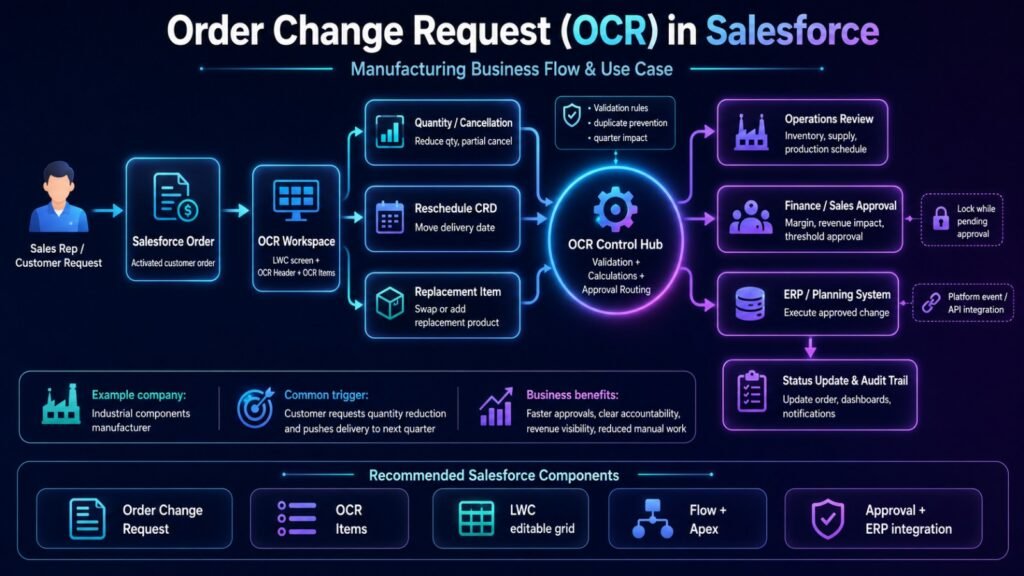
The user starts from a Salesforce Order and opens the OCR Workspace. They select changes (quantity, delivery date, or product replacement). The OCR Control Hub validates, calculates impact, and routes to approvers (Operations, Finance, Sales). Approved changes flow to the ERP for execution. The ERP responds back with status updates that populate the Salesforce audit trail and dashboards.
Business benefits worth measuring
A well-designed Order Change Request workflow delivers benefits that are measurable within the first quarter after go-live.
Approval turnaround typically drops from days to hours because approvers see everything they need on one screen instead of chasing emails. Cross-functional accountability becomes clear because every request has a documented owner, requester, and approval history. Revenue and margin calculations become accurate because the same logic runs on every change instead of being recomputed by three different teams.
Forecast accuracy improves because quarter-crossing changes are identified automatically instead of being missed. Spreadsheet dependency drops because everyone works from the Salesforce record. ERP errors decrease because approved changes flow through structured integration instead of manual re-entry. Audit and compliance controls become real because every change has documented approval steps and audit history.
The customer experience improves too. Order change status becomes visible to Customer Service reps and Account Managers immediately, so customers get consistent updates from every touchpoint instead of contradictory information from three different people.
What this costs to build?
Costs vary based on complexity, but here’s a realistic range for a manufacturing OCR implementation.
A basic implementation with the core two-object data model, one Lightning Web Component, standard approval routing based on revenue thresholds, and simple ERP integration typically runs 12 to 16 weeks with total cost in the $85K to $175K range.
A standard implementation with complex approval routing, fiscal-year quarter logic, multiple business units, cancellation and replacement workflows, and middleware ERP integration typically runs 16 to 24 weeks with total cost in the $175K to $350K range.
An enterprise implementation with multi-region support, multiple ERP systems, complex product hierarchies, replacement product logic, integrated forecast updates, and executive-tier approval workflows typically runs 24 to 36 weeks with total cost in the $350K to $600K+ range.
For detailed pricing information, see the Pashtek pricing page.
FAQ
Can we build this on top of Manufacturing Cloud?
Yes. If you’re already running Salesforce Manufacturing Cloud, the OCR workflow extends naturally on top of Sales Agreements and Account-Based Forecasting. Manufacturing Cloud handles the forward-looking forecast side. OCR handles the transactional order change side. Both share the same underlying customer and product data.
What if we don’t have Manufacturing Cloud?
OCR works fine on standard Sales Cloud with the Order object. Manufacturing Cloud adds forecasting capabilities but isn’t a prerequisite for building an OCR workflow.
How does this integrate with SAP?
SAP-Salesforce integration for OCR typically uses IDocs or SAP’s REST APIs via middleware. The approved OCR triggers a SAP order change document that flows through your SAP workflow for production planning. Approval acknowledgment and completion status flow back to Salesforce. We’ve built this integration multiple times.
What about Oracle, NetSuite, or Microsoft Dynamics ERP?
Same pattern, different endpoints. The Salesforce side of the OCR architecture stays consistent. The ERP integration layer changes based on which ERP you run.
Who handles the Lightning Web Component development?
Custom LWC development requires developers with production experience shipping enterprise LWC components. See our Lightning Web Components development services for detail on the LWC work involved.
How long until we see ROI?
Most manufacturing clients see clear ROI within the first two quarters after go-live through reduced approval delays, better forecast accuracy, and elimination of duplicate manual work across teams. See Pashtek case studies for real client outcomes.
When to start planning?
If you’re a manufacturer already running Salesforce and processing order changes through informal channels, the question isn’t whether to build a proper OCR workflow. It’s when. Every quarter you wait costs you in approval delays, forecast inaccuracy, and cross-team friction that adds up over time.
The right time to start is when your team can commit six to eight hours per week from Sales operations, Finance, and Operations leadership for discovery and requirements sessions. Once those requirements are documented, the build phase typically runs 12 to 24 weeks depending on complexity.
For manufacturers early in their Salesforce journey, OCR often gets built as part of the initial Salesforce implementation rather than as a separate phase-two project. For manufacturers already live on Salesforce, OCR fits naturally into a phased enhancement roadmap through Salesforce managed services.
How Pashtek supports manufacturing OCR projects?
Pashtek has delivered custom Salesforce solutions for manufacturers since 2014. Our approach to OCR projects follows the same delivery model we use across every enterprise engagement: fixed-price scope, weekly demos, senior US-based team, and 90-day hypercare after go-live.
The engagement typically starts with a discovery phase where we work with your Sales, Operations, Finance, Supply Chain, Customer Service, and IT teams to document how order changes work today and design the future-state Salesforce architecture. This produces a written solution design and fixed-price proposal within five business days of discovery completion.
From there, the build phase covers the custom object model, Lightning Web Component development, Flow and Apex automation, approval process configuration, ERP integration, dashboards and reporting, and comprehensive test coverage. Weekly demos give you visibility into progress and let us adjust based on your feedback before we’re 12 weeks deep.
Go-live is followed by 90-day hypercare where our delivery team supports your users through the initial adoption period. After hypercare, most clients transition to managed services for ongoing tuning and enhancement work as the business evolves.
For a conversation about your specific manufacturing OCR requirements, book a free 30-minute call with our team. We’ll discuss your current process, walk through the architecture that fits your operation, and give you a realistic timeline and budget range for your specific project.
If you’re still evaluating whether to build in-house or work with an outside partner, our guide on how to choose a Salesforce implementation partner walks through the evaluation criteria that predict project success.