
Stop Burying Deal Emails on the Account: Log Outlook Emails to the Right Salesforce Opportunity
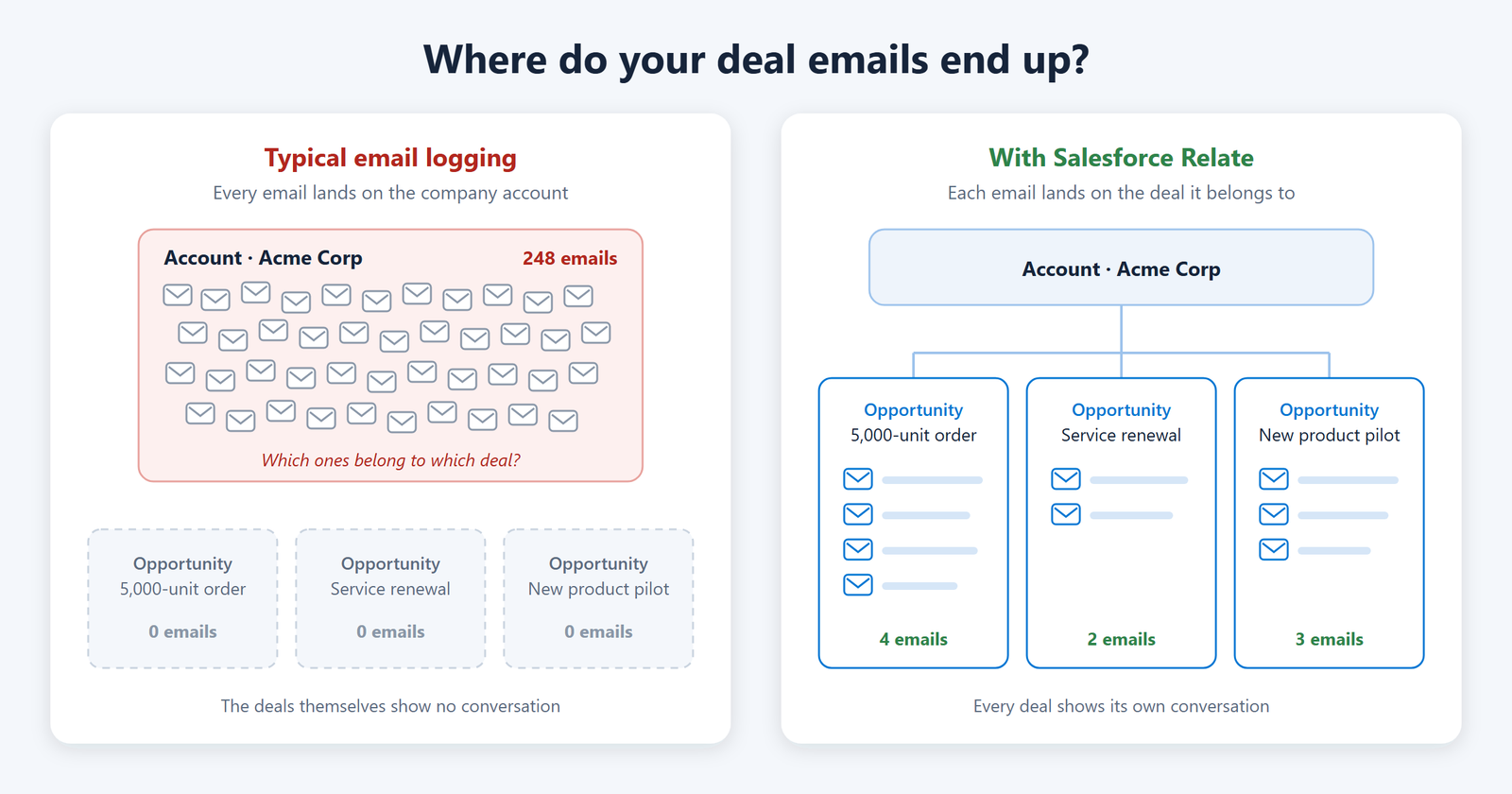
Most Outlook and Salesforce integrations log emails onto the company account, where the thread for one deal gets lost among hundreds of others. Salesforce Outlook integration with Salesforce Relate, an Outlook add-in from Pashtek, saves each email to the exact opportunity it belongs to, in one click. Replies follow automatically, so the whole conversation for every deal sits in one place.
The Problem: Deals live in Salesforce, Conversations live in Outlook
Sales reps spend their day in Outlook, but the deal record sits in Salesforce. Important emails stay in personal inboxes, so managers can’t see what was promised, and a new owner taking over a deal starts from zero.
Standard email logging often makes this worse. Emails pile up on the company account instead of the specific opportunity, so the one thread that matters is buried under hundreds of others. Salesforce email integration helps connect these conversations with the right deal.
What Salesforce Relate does?
- One-click capture– Open an email in Outlook and save it to the right opportunity, contact or lead, attachments included.
- Finds the customer for you– The add-in matches the sender to an existing contact or lead, so reps don’t have to search.
- Replies follow on their ow– Once a thread is saved, a single Sync click brings in every new reply in that conversation.
- A clear email timeline on the deal– Inside Salesforce, emails are grouped by conversation, with files and tasks alongside, making Salesforce email tracking easier.
- Reply from Salesforce- Reply, Reply All or Forward straight from the deal; the email still goes out from the rep’s own Outlook mailbox.
- Follow-ups that show up in Outlook– Create a Salesforce task with a reminder, and the reminder also appears in Outlook.
- Reps stay in control- Turn off syncing for any thread that shouldn’t be tracked.
How it works?
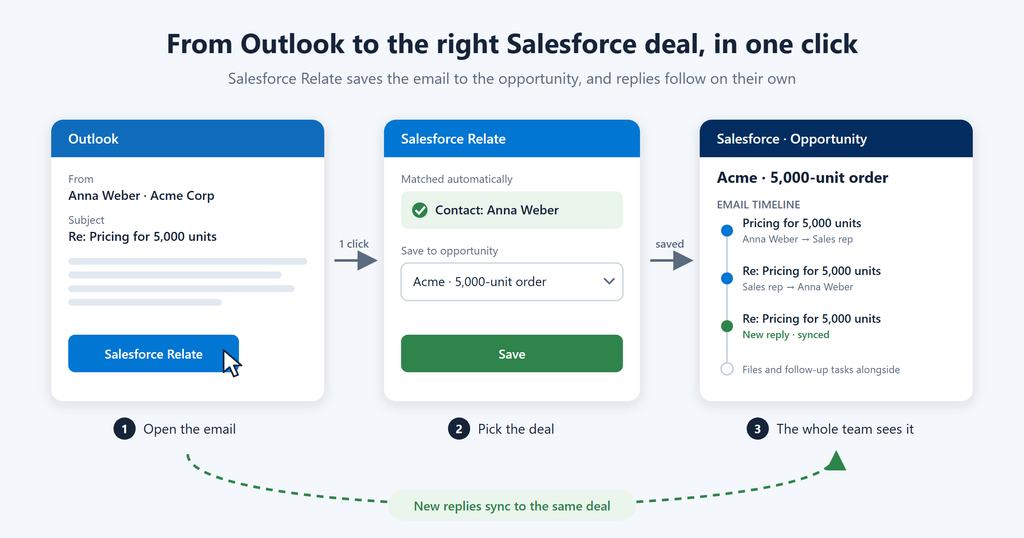
- Open the email in Outlook and click Salesforce Relate.
- Pick the deal. The add-in suggests the matching contact or lead; choose the opportunity and save. This lets reps log Outlook emails to Salesforce without manually copying the conversation.
- Keep selling. Later replies sync to the same deal, and the whole team sees the conversation in Salesforce.
It connects to Outlook through Microsoft’s official Graph API, and emails are stored as normal records in your own Salesforce org.
Why sales teams like it?
- Less admin. Reps log an email in seconds instead of copying text between two apps.
- Full visibility. Managers see every customer conversation on the deal it belongs to.
- Smooth handovers. A new owner reads the full history before the first call.
- Nothing slips. Follow-up reminders land in the Outlook inbox reps already watch.
- Built for your org. It is built on standard Salesforce, so it fits your existing objects, security and reports. This supports more effective Salesforce opportunity email management.
Get started
Want every customer email on the right deal, without extra work for your reps? Book a free 15-minute demo, and we’ll show Salesforce Relate running with your own Outlook and Salesforce setup.